Sci-Fi Labs · App
One prompt. Your own life map.
Clone the globe. Swap one file. Get a Where is [You]? spatial web app. The live map is the demo. Your copy is the repo.
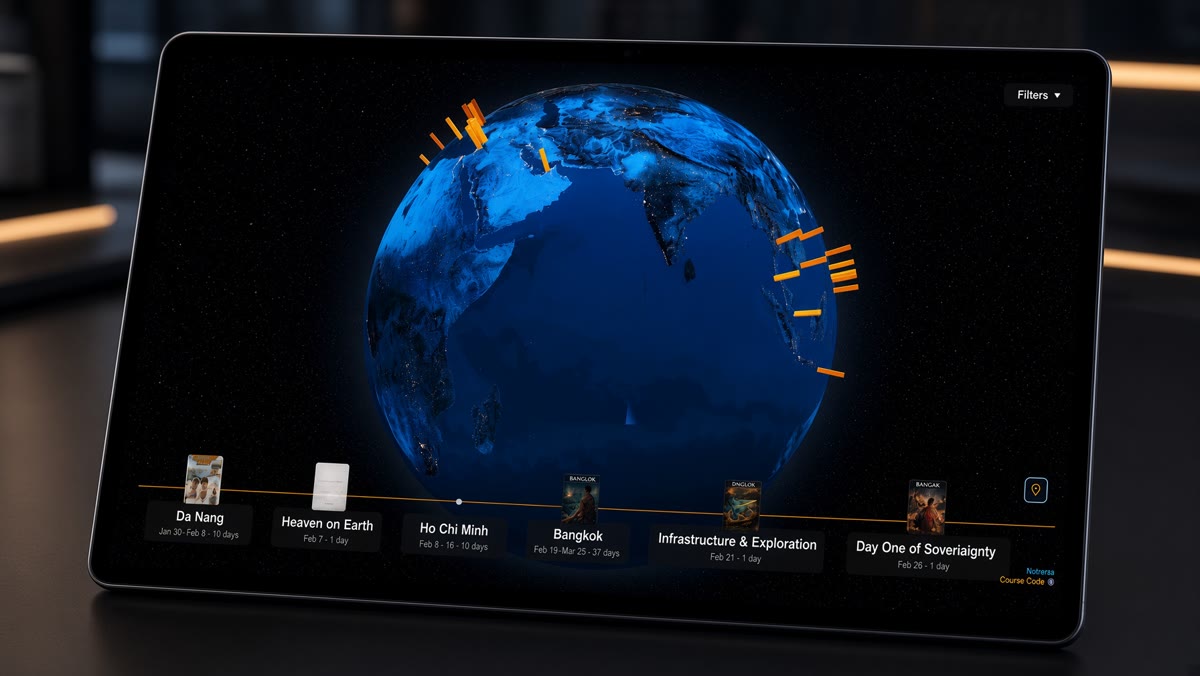
Where is Paul? is a spatial web app. A life on a globe. The color of a place is how long a stay lasted. Same URL on a phone, a desk, and Safari on Vision Pro. Pinch to zoom. Look to look around.
You do not need a chatbot to start. You need the repo.
moments/moments.js. The Grok prompt is second, if you want Takeout to fill the globe for you.The door
Clone it
Repo: github.com/paulvisciano/where-is-paul
This is a static site. No database. No backend. No account. You decide what exists by what you put in the files.
Run it locally
git clone https://github.com/paulvisciano/where-is-paul.git
cd where-is-paul
npm install
npm start
Open http://localhost:8080. Don’t open index.html as a file — posts fetch over HTTP.
Replace the pins
Open moments/moments.js. That is the only file you need to change for a globe of your life. Replace the window.momentsInTime array with your stays. One object per pin:
{
  id: "lisbon-2025-10-12",
  title: "Lisbon",
  date: new Date("2025-10-12T00:00:00Z"),
  timelineHighlight: "Lisbon",
  tags: ["city"],
  snippet: "One paragraph. This is the card on the globe.",
  fullLink: "#",
  image: "/moments/lisbon/2025-10-12/image-thumb.webp",
  imageAlt: "Lisbon",
  location: { lat: 38.7223, lng: -9.1393, name: "Lisbon, Portugal" },
  stayDuration: 12,
  formattedDuration: formatDuration(12)
}
stayDuration is days. That number is the hex color: a few days stay bright orange, months go darker. Not height.
To drop the people in the demo, set window.characters = [] in characters/characters.js.
Written posts live at moments/<city>/<YYYY-MM-DD>/content.html. Comics, photos, and video sit in that folder or on any https:// URL. Publish is any static host. vercel.json is already in the repo.
If you want Takeout to do the typing
Google already has a record of where you went, if Maps Timeline was on. Coffee shops. Routes to work. Weekends. A lot of people never looked at it. Get the file out. Put it on a globe you control.
Copy everything in the box and paste it into Grok, Claude, ChatGPT, or any AI that can build a web app. After the clone, not instead of it.
Build me a personal life map like this one: https://paulvisciano.com/apps/where-is-paul

Start from this repo: https://github.com/paulvisciano/where-is-paul
The only file I should have to change is moments/moments.js.

Rename it to “Where is [My Name]?” and set it up so I can drop in my own Google Maps Timeline export and have the globe and timeline fill with my places. The color of each place encodes stay duration, not height. Same URL in a browser, on a phone, and in Safari on Vision Pro.
How to get Timeline data
Google moved a lot of this onto the phone in late 2024. Two places to look.
From your phone (recent trips)
Android. Settings → Location → Location services → Timeline → Export Timeline data. You get Timeline.json.
iPhone. Google Maps app → profile → Settings → Personal content (or Location & Privacy) → Export Timeline data → Save to Files.
From Google Takeout (older history)
takeout.google.com. Deselect all. Check only Location History (Timeline). JSON. Download the zip. If you want the fullest picture, do both. Older data often still lives in Takeout. Newer data is usually on the device.
What to do next
- Open the live globe: Where is Paul?
- Clone the repo, run
npm installandnpm start, then editmoments/moments.js. - If you want auto-fill, paste the prompt and drop
Timeline.json.
The category this sits in: What are Spatial Web Apps?