Running Local AI on 16 GB Mac
16 GB M2 Pro. A 27B model. Whisper in. Browser still open. Conversation mode: 14.73 GB used, pressure green.
The goal
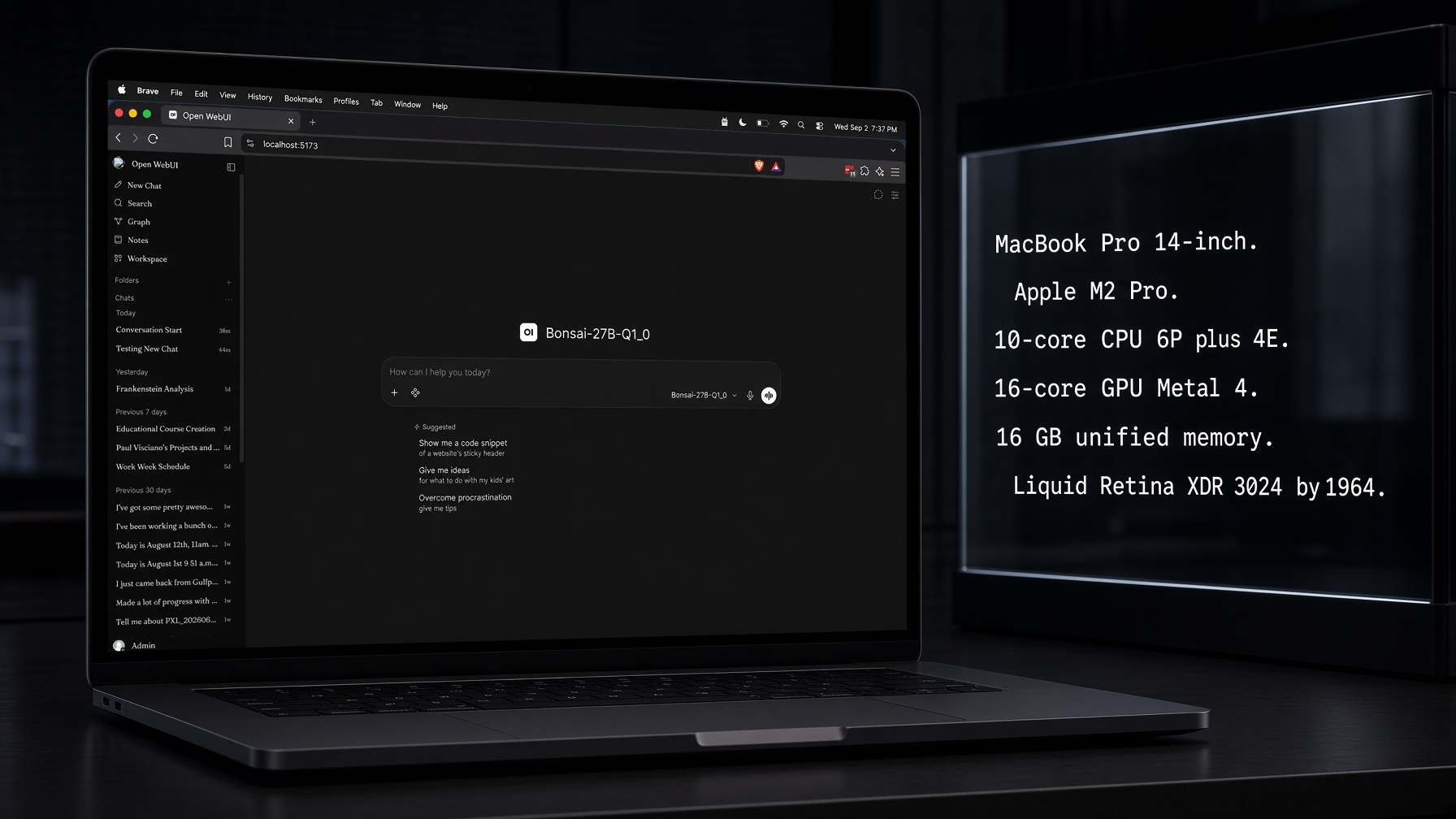
Talk to a local AI on my 16 GB Mac while still using it. Not a benchmark rig. The laptop I browse and code on.
You can run local AI on a 16 GB laptop. I did. 27B model, speech in, speech out, browser still open.
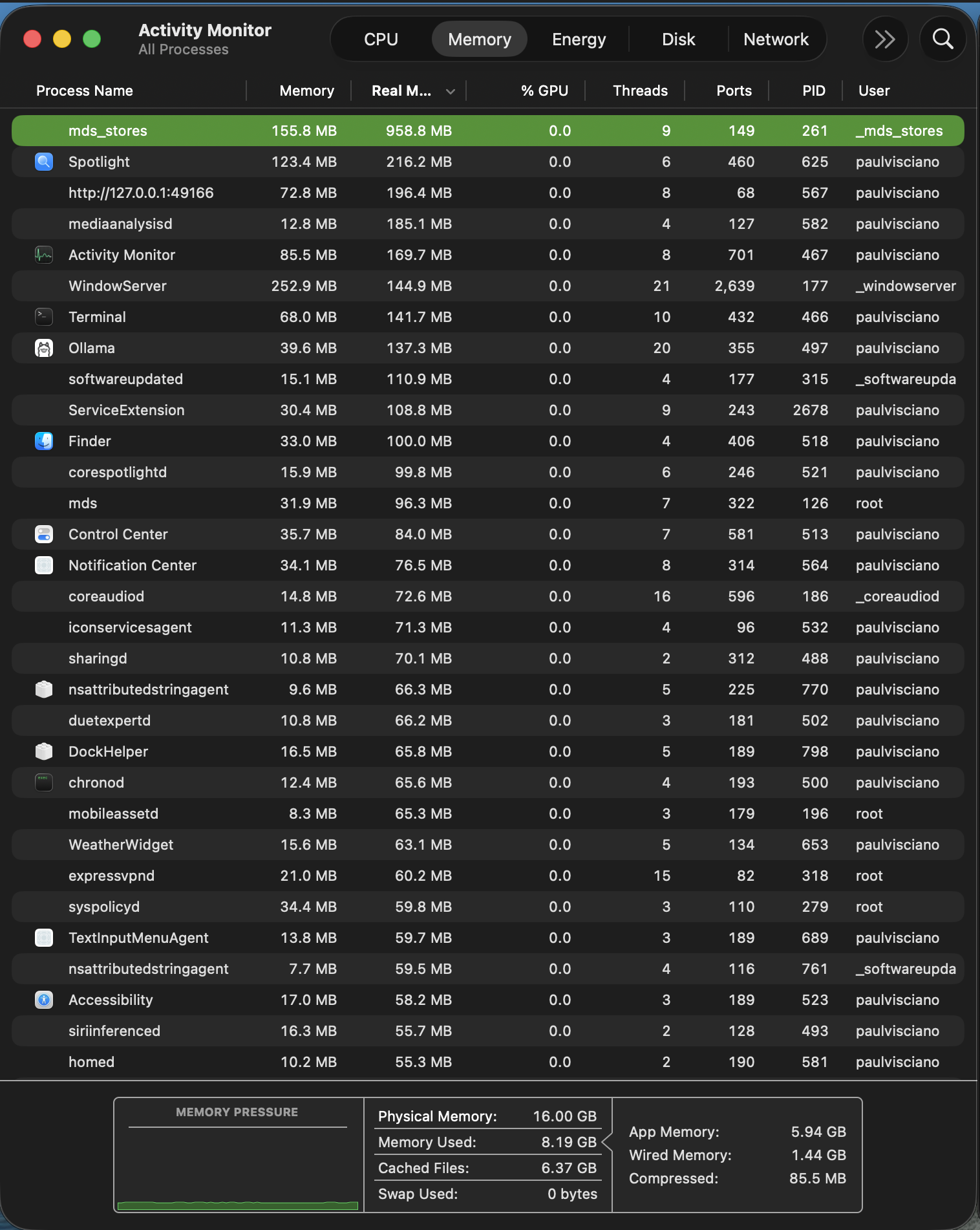
Idle, before any of that: 8.19 GB used. 565 processes. Most of them I didn't install. Extra processes eat memory the model could use. That's why I'd swap for an OS that only runs what I named — not a bunch of background stuff I've never heard of. That's for another time. Part 1.
Back to this laptop. Simpler setup than the last write-up — no RAG. I captured four states so we have a baseline: what local AI actually uses on this laptop, and how the memory is allocated:
- Idle. No models. 565 processes.
- Loaded. Model in memory, not talking yet.
- Text chat. Generating.
- Conversation mode. Whisper in, generating, still using the laptop.
Those four states ran on one stack: Open WebUI in the browser, llama.cpp serving Bonsai, Whisper in, Kokoro out. No Knowledge Graph. No LightRAG. No Docker, no embeddings server, no second llama slot. If you read the previous 16 GB budget, forget its process list — that was the older setup: Postgres, LightRAG, two model slots, Whisper as its own server. Different stack, different swap. Don't mix the two.
Hugging Face lists a 3.9 GB deployed footprint. That's the model file on disk. It doesn't count what else you have running, or the full memory once you talk to it — the conversation cache (KV cache) included. Every number from here on came off this machine, live.
Conversation mode
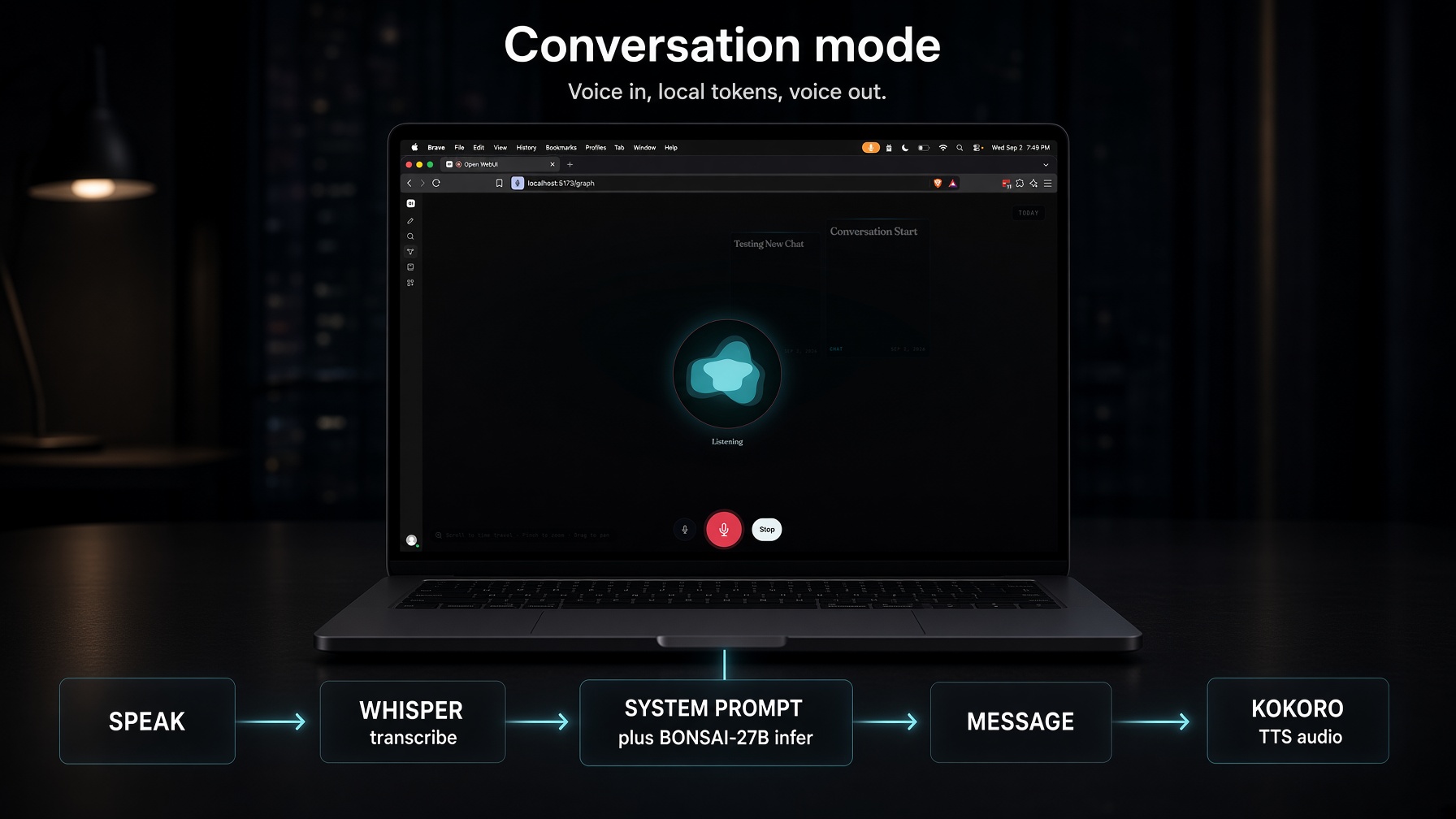
You talk into the laptop. Whisper is the speech-to-text model — it writes down what you said. It runs inside Open WebUI's Python process on this machine. The 27B model reads those words plus whatever rules you set, and writes a reply. Kokoro is the text-to-speech model — it reads that reply out loud in the browser. Five hops. None of it leaves the machine. Type instead of talk and you skip Whisper and Kokoro.
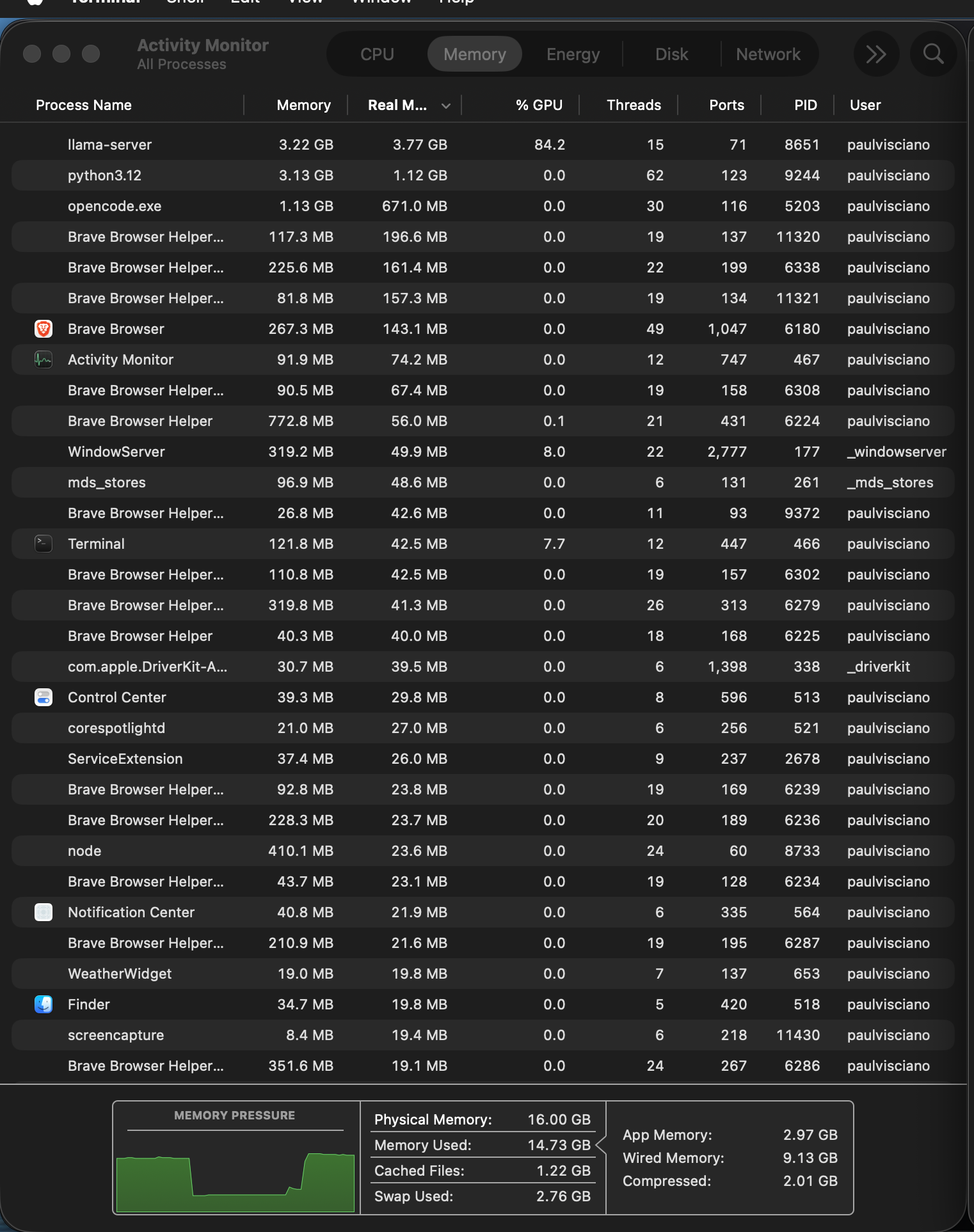
Whisper is why python3.12 reads 1.12 GB real in the capture. You don't load that when you type. It stays loaded between turns, so you pay it once per session, not once per sentence. Kokoro sits in that same Python process. Neither one is a second 27B on the GPU. The expensive part is still the 27B generating — talking or typing.
The comparison
Same laptop, four states. Where Memory Used lands in the 16 GB pool, state by state.
Loading Bonsai costs about 3 GB of Memory Used. The first generation costs another 3.4 — mostly wired. Conversation mode adds almost nothing on top. Pressure never went red.
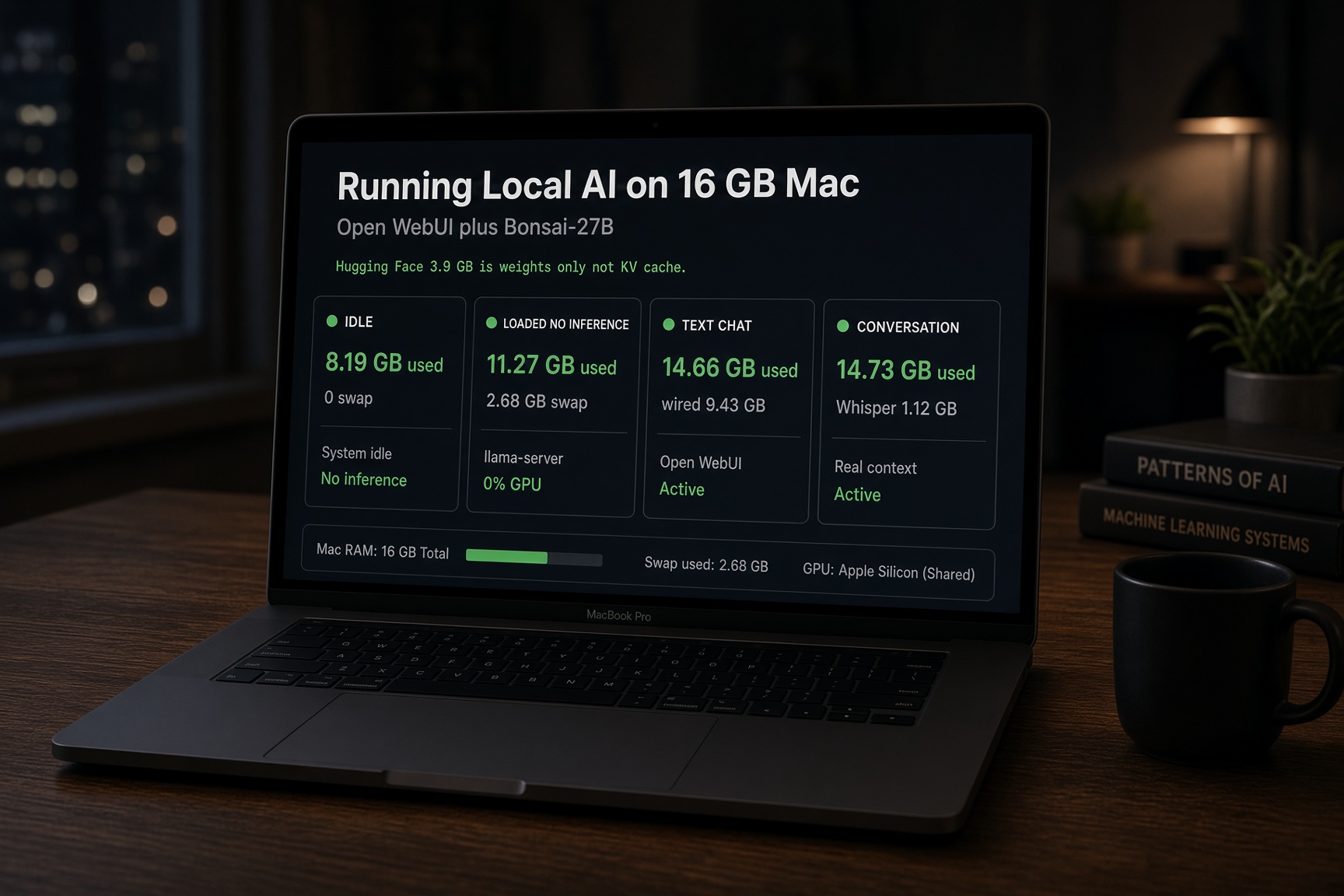
Each card is a full Activity Monitor capture from that state — swap, wired, compressed, pressure, and the process on top.
The original Activity Monitor captures:
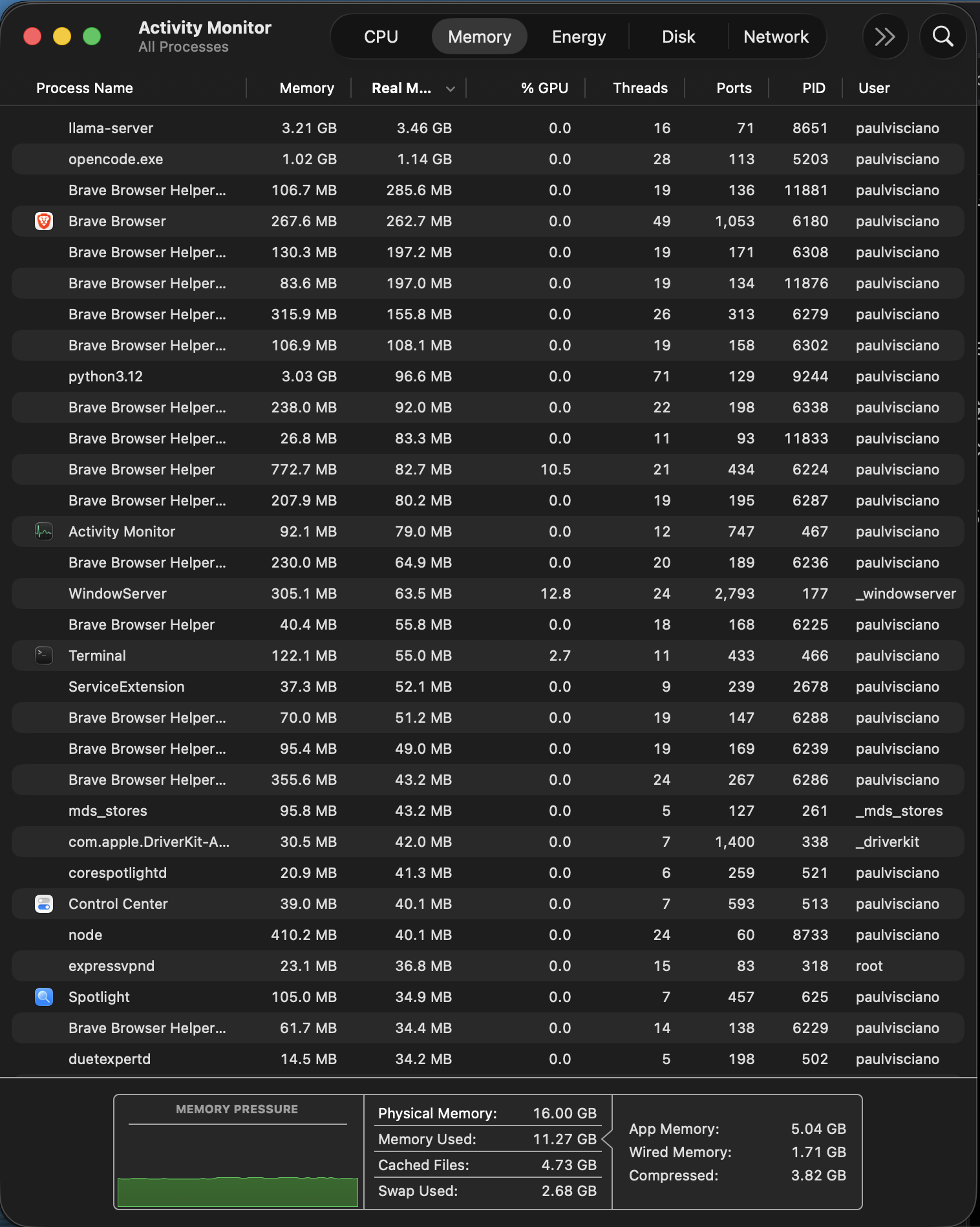
Loading the model is not the expensive part. Memory Used goes 8.19 → 11.27 GB. Compressed jumps 85.5 MB → 3.82 GB. Swap shows up: 2.68 GB. Pressure still green.
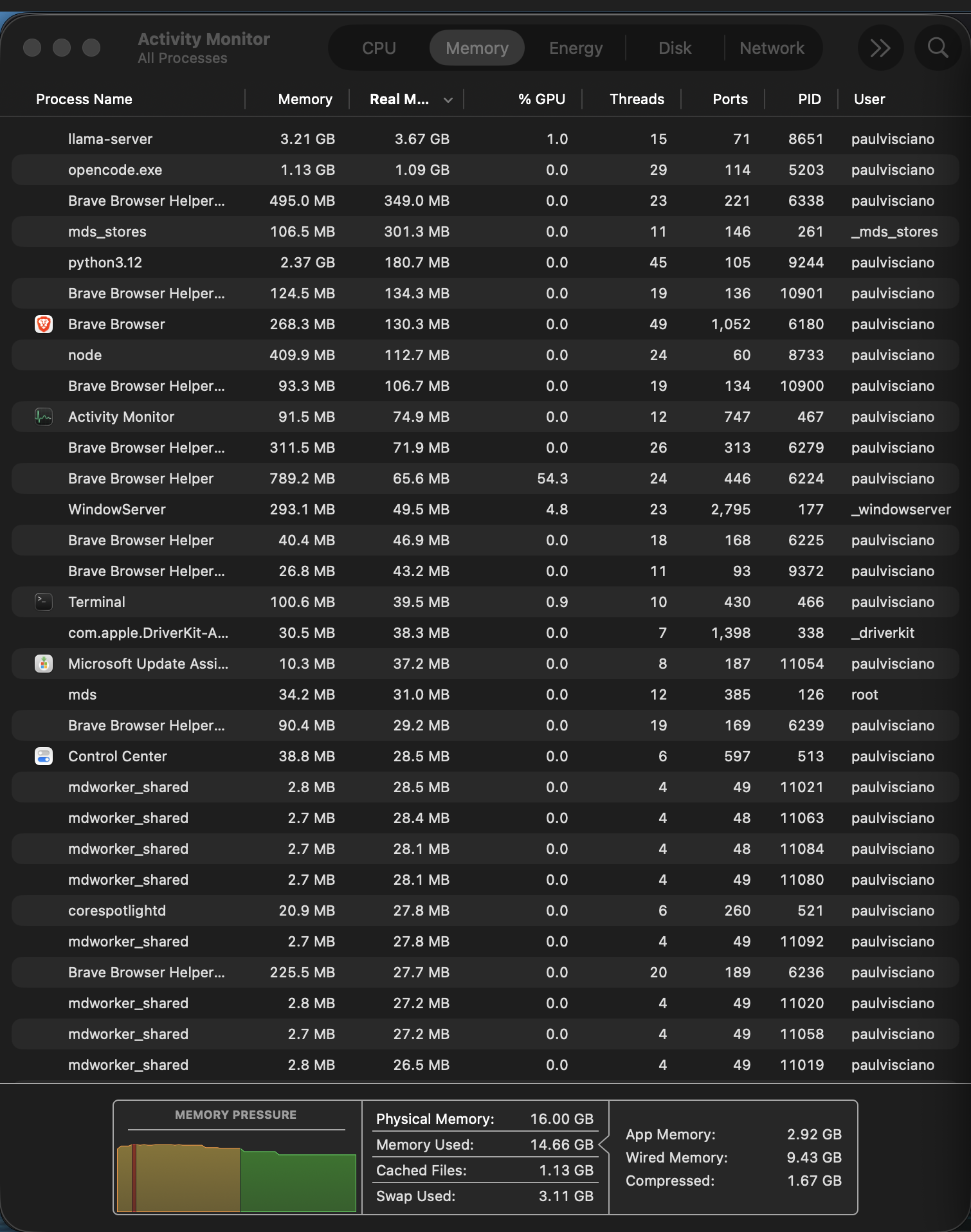
Talking to it is the jump. Wired goes 1.71 → 9.43 GB. The model file didn't get bigger. The laptop now has to remember every token of the conversation — that's the cache — and the GPU pins memory to actually compute. Loaded and idle, the model is a file sitting in memory. First reply, that working set gets locked down and stays as long as the model is warm.
Two readings that look like typos and are not. One: swap exists at all — 2.68 GB with pressure green. macOS compresses and swaps before the machine is in trouble. Swap on this box means the OS is making room, not failing. Two: swap drops from 3.11 GB (text chat) to 2.76 GB (conversation). These are not cumulative screenshots. Each was captured in its own moment. Conversation mode came later in the session, with slightly more of the working set back in physical memory. Read the trend, not the delta.
Whisper shows up as python3.12 real memory — 1.12 GB — not another 8 GB of GPU. Brave and a coding session stay in the list the whole time.
565 processes
MacBook Pro 14" (Mac14,9). Apple M2 Pro. 10-core CPU, 6 performance plus 4 efficiency. 16-core GPU, Metal 4. 16 GB unified memory. There is no separate VRAM. CPU, GPU, OS, and models share one pool. Every byte a model takes is a byte the browser is not using.
Idle, no models, this laptop is already running 565 processes. Finder, Safari, Activity Monitor — you can name those. mds_stores, sharingd, duetexpertd, siriinferenced, homed — I didn't install those. Almost all of them shipped in /System. You cannot uninstall most of them.
The pie is Memory Used at idle, 8.19 GB. Cached files (6.37 GB) sit outside it. Apps I opened are 9%. The rest is the OS.
Memory used at idle · 8.19 GB
- Search / Spotlight familymds, mds_stores, Spotlight, corespotlightd, mediaanalysisd1.56 GB · 19%
- AppsTerminal, Activity Monitor, Ollama, VPN, a local webview0.71 GB · 9%
- The desktopWindowServer, Finder, Dock, Control Center, Notification Center0.47 GB · 6%
- Apple daemonsGatekeeper, updates, Siri, HomeKit, AirDrop, audio, widgets1.11 GB · 14%
- Wired + compressed1.44 GB wired · 85.5 MB compressed · from the footer1.53 GB · 19%
- The other ~530 processesLaunchAgents and XPC helpers not in the screenshot2.81 GB · 34%
1.56 + 0.71 + 0.47 + 1.11 + 1.53 + 2.81 = 8.19 GB. Cached files 6.37 GB sit outside this pie. Physical memory 16.00 GB. Swap 0 bytes.
Apps
The 9% slice. Terminal, Activity Monitor, a leftover Ollama daemon, a VPN. I opened these.
| Process | Mem | What it is |
|---|---|---|
| Activity Monitor | 86 MB · 170 MB real | The app in the screenshot. |
| Terminal | 68 MB · 142 MB real | The window running the commands. |
| Ollama | 40 MB · 137 MB real | Leftover daemon. Zero models loaded. Not the stack. |
expressvpnd | 21 MB | VPN I installed. Not Apple. |
http://127.0.0.1:49166/ | 73 MB · 196 MB real | A local webview some app opened. Not Apple. Not the stack. |
The desktop — you cannot uninstall this
Comes with the OS. This is how a window appears on a Mac.
| Process | Mem | What it is |
|---|---|---|
| WindowServer | 246 MB · 23.5% GPU | The compositor. Every pixel on screen goes through this. |
| Finder | 34 MB | The file manager. Always on, even with no windows. |
| Dock + DockHelper | 26 MB + 17 MB | The icons at the bottom of the screen. |
| Control Center | 36 MB | Wi-Fi, Bluetooth, Focus. The menu you open twice a day. |
| Notification Center | 34 MB | Banners. Running whether anything is notifying or not. |
loginwindow | 18 MB | The session that started when you typed your password. |
Search
Spotlight is not one process.
| Process | Mem | What it is |
|---|---|---|
mds | 37 MB | Metadata server. The Spotlight brain. |
mds_stores | 142 MB · 910 MB real | The actual index. Still chewing from the boot reindex. |
| Spotlight | 123 MB | The magnifying glass. The UI. |
corespotlightd | 16 MB | In-app search. Mail, Messages, every bundle that opted in. |
mediaanalysisd | 39 MB · 215 MB real | Scans photos and video for objects, scenes, faces. You did not ask. |
Voice you did not open
Hide Siri. These still run.
| Process | Mem | What it is |
|---|---|---|
siriinferenced | 16 MB | On-device Siri model. Waiting for a phrase you are not saying. |
sirttsd | 26 MB | Siri text-to-speech. Waiting to talk. |
Policy, drivers, keep-alive
Gatekeeper, updates, Wi-Fi, HomeKit. Things that stay on.
| Process | Mem | What it is |
|---|---|---|
launchd | 15 MB | PID 1. Starts everything else. You cannot kill it. |
syspolicyd | 34 MB | Gatekeeper. "Are you sure you want to open this?" |
softwareupdated | 15 MB · 111 MB real | Checks for macOS updates in the background. |
| DriverKit-AppleBCMWLAN | 30 MB | The Wi-Fi driver. A process now, not just a kext. |
| Accessibility | 17 MB | VoiceOver / zoom plumbing. Runs even if you never turn them on. |
| WeatherWidget | 16 MB | The widget. Present whether you added it or not. |
| ServiceExtension | 31 MB | A plugin host. Some app's helper, named like a virus. |
| VTDecoderXPCService | 19 MB | Hardware video decode. A helper for anyone playing a frame. |
coreaudiod | 15 MB · 73 MB real | Core Audio. Every beep, every mic. Always on. |
iconservicesagent | 11 MB · 71 MB real | The icon cache. Finder and Dock thumbnails. |
sharingd | 11 MB · 70 MB real | AirDrop, Handoff, "sharing." Waiting for a nearby Mac. |
duetexpertd | 11 MB · 66 MB real | Continuity. Sidecar, Universal Clipboard. Named after the research, not the iPad app. |
chronod | 12 MB · 66 MB real | Calendar / time-sensitive events. A clock with opinions. |
mobileassetd | 8 MB · 65 MB real | Downloads Apple system assets. Fonts, dictionaries, Siri bits. |
nsattributedstringagent | 10 MB · 66 MB real | Text layout helper. Apple uses it everywhere you see styled text. |
| TextInputMenuAgent | 14 MB · 60 MB real | The input-source menu. Flags, keyboards, the 中 character. |
homed | 10 MB · 55 MB real | HomeKit. Your house, as a daemon. |
siriinferenced still runs.Load average 16.6 on a 10-core machine looks like a laptop on fire. It isn't. The consumers are mds and five mdworker_shared processes — Spotlight, reindexing after boot. The load will drop. The process count will not. Spotlight will finish. siriinferenced will not leave. That is a Mac at rest.
Those 565 names eat memory the model could use. I have not measured Omarchy on this desk.
Look at the four photos. Brave is open. A coding session is in the list. Spotlight never left. Conversation mode at 14.73 GB used of 16, pressure green. VS Code was not in these photos. I will not invent it. The headroom is there.
You can do this without swapping the OS
You can run your own AI without swapping the OS. I did.
Changing the OS is what gives you full control — what apps run, what connects to the internet, how it looks. Start with Part 1.